
Google does not have the resources to crawl every page on the internet at once. That is why each website receives a limited ‘crawl budget’, which determines how many pages will be visited and scanned over a given period.
Imagine your website is a huge shopping centre. If Google only has time to open some of the shopfronts, the rest remain invisible to customers. That is exactly what crawl budget does – it determines which pages will appear in the results and which will not get the chance to be seen.
Understanding and managing this resource effectively is the key to faster indexing and a stronger presence on Google.
Put simply: crawl budget is the filter that determines which pages become visible and when.
What is crawl budget?
Crawl budget is the total resource Google allocates to crawling a particular website within a given period. It indicates how many URLs can be crawled and analysed without overloading the server or wasting capacity on unimportant pages.
For example, if Google can crawl 2,000 pages per day but your website has 10,000, you need to ensure that the most important pages fall within that limit.
In summary: it is a balance between the website’s technical capabilities and Google’s interest in its content. The more effectively the crawl budget is managed, the faster and more comprehensively the content enters the index.
The two key factors behind it
- Crawl rate limit – the maximum speed at which the bot scans the website without overloading the server.
- Crawl demand – Google’s level of interest in the content.
Google Search Central states: ‘Crawl budget is generally not an issue for websites with fewer than 1,000 pages.’
According to Ahrefs, websites with a well-organised sitemap achieve up to 28% faster indexing.
Ultimately: the larger the website, the more important it is to manage crawl capacity effectively.
How does indexing work?
Indexing is the process by which the content of a particular URL is stored in Google’s database. Only resources included in the index can appear in search results.
The stages are straightforward: Googlebot visits the URL, the algorithms analyse the content and links, and a decision is made as to whether the page is unique, useful and accessible.
HubSpot notes that more than 61% of SEO professionals rank indexing speed among their top priorities.
Put simply: fast indexing is the result of properly targeted crawling resources.
Why is crawling so important?
Crawling is the first step before inclusion in the index. If Googlebot does not crawl a resource, it has no chance of appearing in the results.
Examples of when crawling is critical:
- News websites – if the algorithms do not register a story in time, it loses its value.
- Online shops – new products need to be indexed quickly to reach customers.
Semrush demonstrates that websites with optimised speed receive an average of 23% more crawls per month.
In summary: without crawling, there is no indexing and no visibility.
Why is crawl budget important?
It is a limited resource that must be managed strategically. If capacity is spent on duplicate or useless URLs, valuable pages remain outside the spotlight.
Management tools
- Sitemap.xml – identifies priority pages.
- Robots.txt – blocks pointless and automatically generated URLs.
For example, an online shop with filters for size, brand and colour can create hundreds of thousands of unnecessary URLs that consume crawl capacity.
Put simply: allocating crawl resources correctly ensures that important sections are indexed faster.
How can I check my crawl budget?
Every website has a different crawl capacity. You can see the actual data in Google Search Console → Crawl Stats.
Guidelines
- Small websites – a few hundred inquiries per month are sufficient.
- Large websites – thousands of crawls per day are needed to keep the index up to date.
In summary: monitor the reports in Search Console and assess whether the bot is wasting time on secondary resources.
How can I optimise my crawl budget?
Optimisation means directing the algorithms towards valuable resources and minimising waste.
Optimisation checklist
- Create an up-to-date sitemap.xml containing priority pages.
- Configure robots.txt to block duplicate URLs and filters.
- Build a strong internal linking structure.
- Remove 404 errors and unnecessary redirects.
- Improve speed by optimising images and hosting.
Backlinko shows that websites with a clear internal structure achieve 36% faster indexing.
Put simply: every step in technical optimisation improves crawling efficiency.
Which errors consume crawl capacity?
Common problems include:
- Duplicate content.
- Automatically generated parameters.
- Infinite filters.
- A slow server.
- No sitemap.xml.
For example, a news website with date-based archives can accumulate thousands of pages with no traffic.
In summary: remove duplicates and unnecessary URLs to free up resources for valuable sections.
When is crawl budget not an issue?
For small websites with fewer than 500 URLs, resources are almost never an issue – the bot can crawl everything at once.
The real problem arises with large-scale projects containing thousands of pages and dynamic content. In these cases, a management strategy is essential.
Put simply: there is no cause for concern with small websites, but large websites require regular optimisation.
What role do internal links play?
Internal links show the algorithms which sections are priorities.
Key principles:
- More links to a resource = more frequent crawling.
- Orphan pages (pages with no links) often remain uncrawled.
In summary: internal links are Google’s guide through your website.
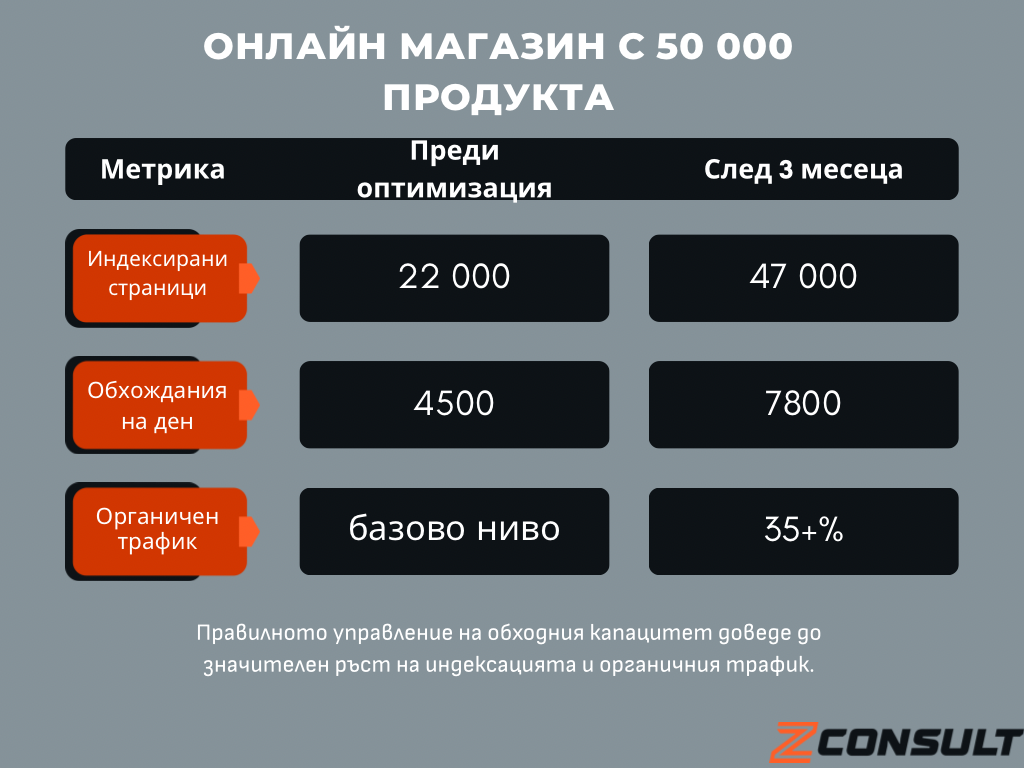
Case Study: Online shop with 50,000 products
Problem:
A large online shop had 50,000 products, but only 22,000 were included in the index.
Analysis:
Google was spending resources on filters and parameters, generating more than 200,000 unnecessary URLs.
Solution
- Blocking filters in robots.txt
- A new sitemap containing priority products
- Removing duplicate URLs
- Speed optimisation
Result
Management tools
- Google Search Console – displays actual crawl data.
- Screaming Frog – identifies duplicates and technical errors.
- Ahrefs and Semrush – analysis of indexing and crawl issues.
- Sitebulb – comprehensive technical audits.
Put simply: a combination of GSC and professional tools is essential for large-scale websites.
FAQ – Frequently Asked Questions
- How can I tell whether Google is missing important resources?
Check the number of indexed URLs in Search Console and compare it with the actual volume of content. - How often does Google crawl websites?
Popular websites – daily; smaller websites – several times a week or month. - Does speed affect crawl capacity?
Yes. The faster a website loads, the more resources can be crawled. - Which is more important – sitemap.xml or robots.txt?
Both. Sitemap points to priority pages, while robots blocks unnecessary ones. - How can I speed up the indexing of new content?
Add it to the sitemap, create internal links and use Inspect URL in Search Console. - Does hosting matter?
Yes. Stable, fast hosting improves speed and allows more crawls. - What is crawl demand?
It is the algorithms’ level of interest in the website – the more popular and up to date it is, the more attention it receives. - Can I increase crawl resources artificially?
Not directly. However, optimising the structure and regularly updating content will encourage Google. - How often should I optimise my crawl budget?
Large websites – an audit at least once a quarter. Small websites – whenever significant changes are made. - What is the difference between crawl budget and indexation budget?
Crawl budget is the number of URLs that can be crawled. Indexation budget is the number of resources that enter the index.
Optimise your crawl budget today
Crawl budget is a limited resource that determines which pages will be crawled and when they will be indexed. The issue is minimal for small websites, but managing it is critical for large online shops and media websites.
Correctly configuring sitemap.xml, robots.txt, internal links and speed ensures that Google uses its capacity on content with genuine value.
Start today – check your crawl budget in Google Search Console, identify weaknesses and implement optimisation. Every day of delay means lost potential traffic.

Author
Yordan Mirchev
BEO specialist
Yordan is part of the BEO/SEO team. He focuses on analysis, content, and optimisation according to real business needs.
View author profile